Enter the Pro (Exploring Platform Latency, Pt. 3)
The PS5 Pro is a better choice than base PS5 for competitive play, but not for the reason you're thinking.

“Perfection is achieved, not when there is nothing more to add, but when there is nothing left to take away.”
– Antoine de Saint-Exupéry
Quick recap, for anyone landing here first:
- PC is the fastest way to play SF6 – but only barely. A 5090 at 240Hz posted the lowest latency I’ve ever recorded (52.6ms on Ranger’s Hut); everything below is a dogfight.
- The PS5 is *not* a different game. With correct settings it’s a handful of milliseconds off a mid-range PC.
- VRR is the whole ballgame. Run the base PS5 at 120Hz without it and you balloon to ~100ms. That’s a settings problem, and it’s yours to fix.
So here’s the only question that matters: does the PS5 Pro actually do anything for input latency, or is it just a prettier way to lose? Let’s explore.
The Setup
Nothing has changed about how I measure. Same Arduino rig built with @noodalls, same GP2040 controller, same button-to-photon timing. New numbers are 100 trials per stage (±1.67ms); the base-PS5 and PC references carry over from the 1000-trial runs (±0.53ms).
As always, the only honest unit in this hobby is still the frame – 60fps or about 16.67ms.
Where the Pro Lands
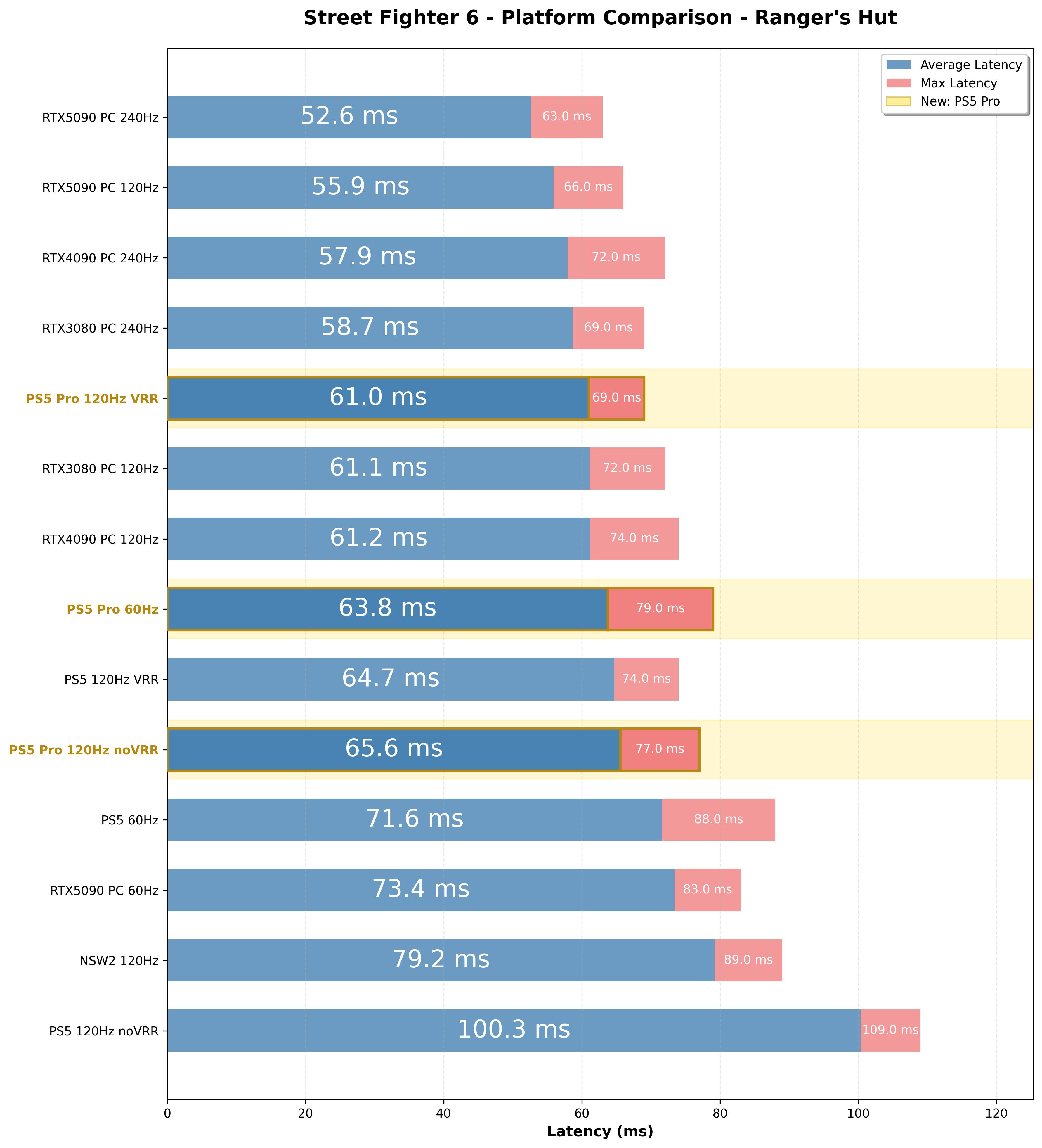
PS5 Pro 120Hz VRR (61.0ms) lands dead even** with my RTX 3080 or 4090 rig at 120Hz, and about 3.6ms ahead of the base console’s best VRR result – a fifth of a frame, the same direction across all 21 stages. Modest, but real. On its own, that’s a boring article, so time for the interesting part: what happens when you get your settings wrong.
The Redemption Arc
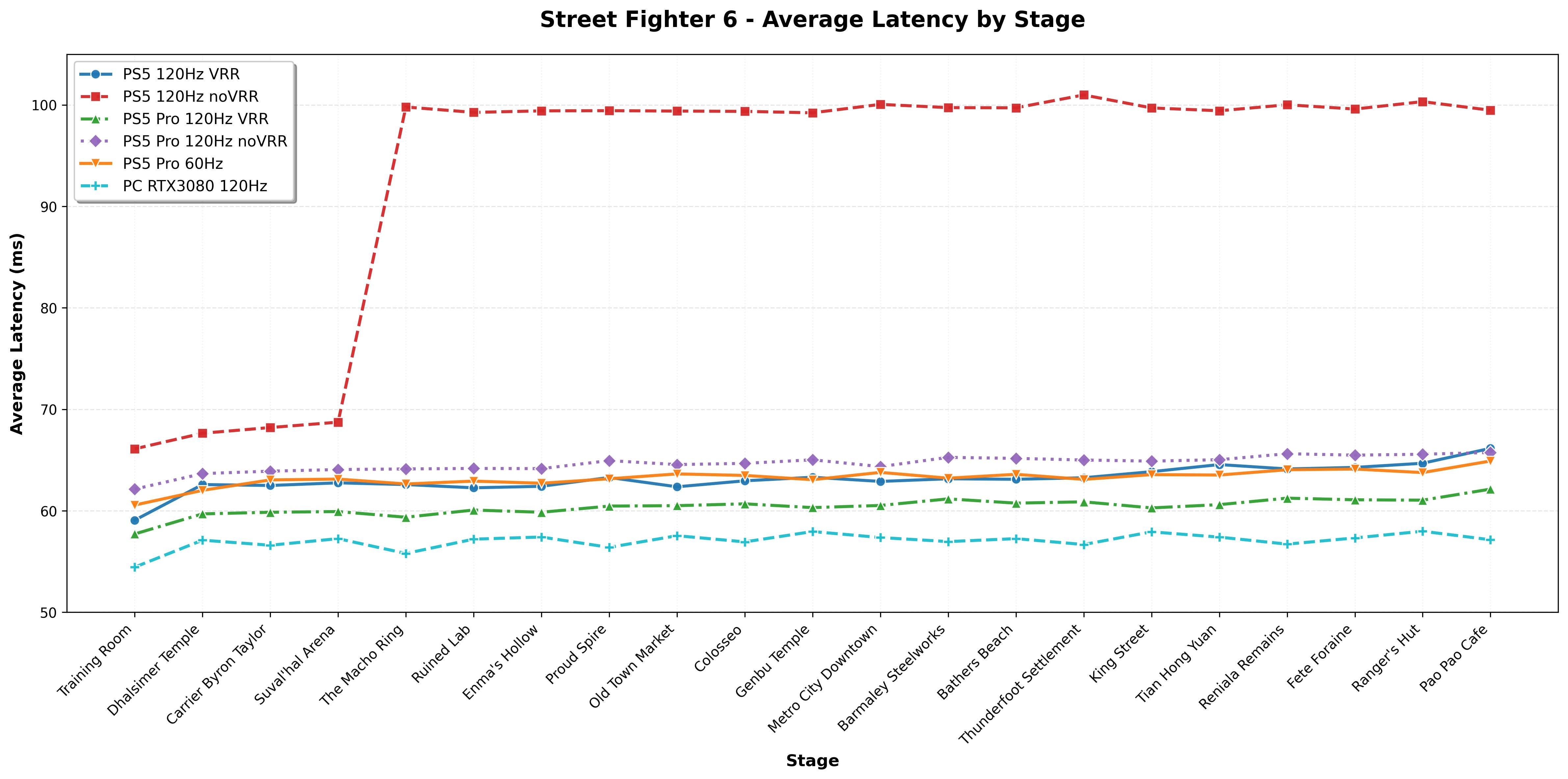
That red line near 100ms – nearly two full frames – is the most damning result in this whole series. It’s the base PS5 at 120Hz without VRR, and it’s why I’ve spent a year and two articles begging you to check your settings. The penalty for that one toggle is brutal: a reasonable 64.7ms with VRR on jumps to 100.3ms without it. That’s about 35ms – more than two full frames – surrendered for a single wrong (default) setting.
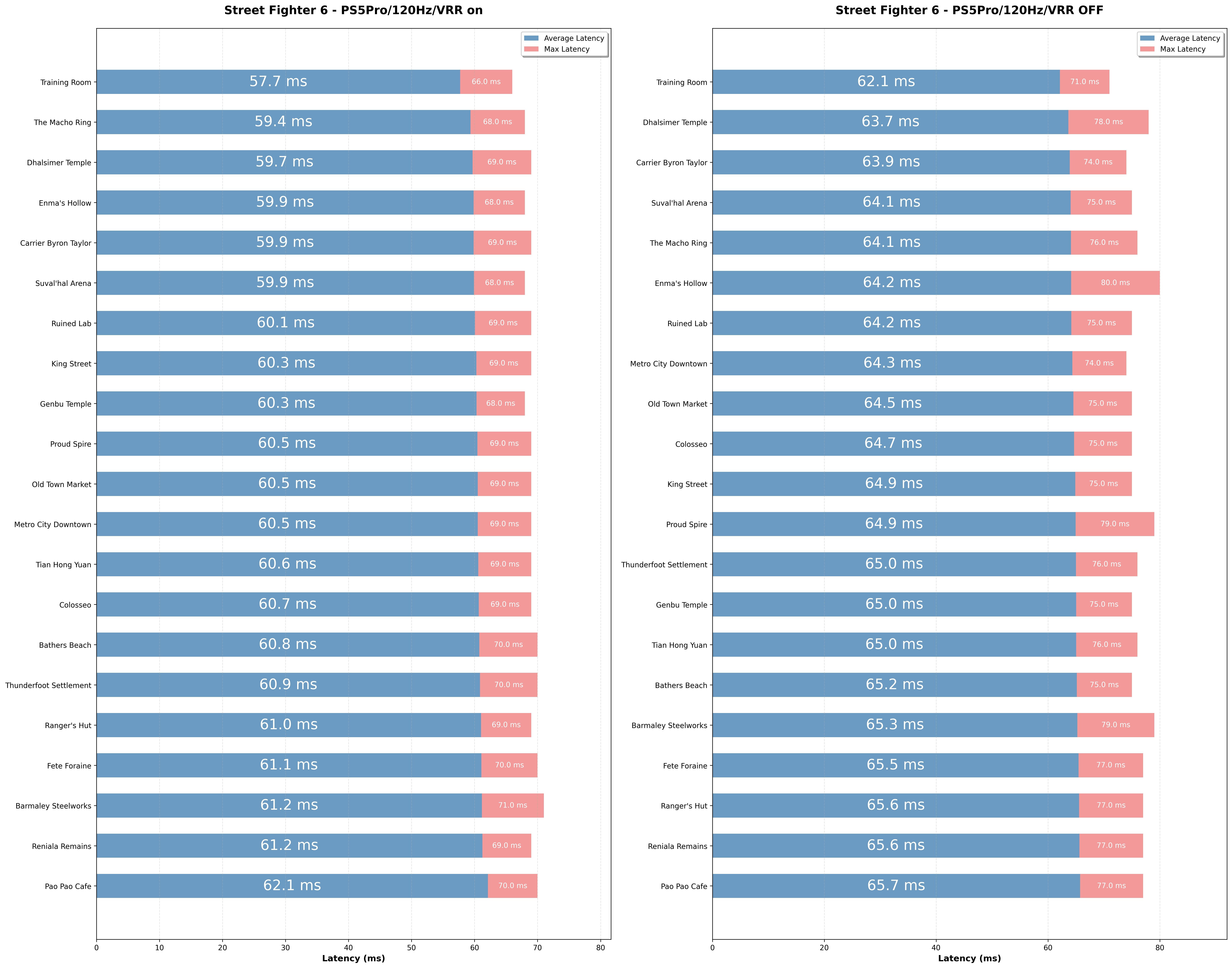
Now watch the Pro do the same thing wrong. At 120Hz without VRR it sits at a calm 65.6ms – only a few milliseconds above its own VRR result of 61.0ms. That’s roughly a quarter of a frame.
The base PS5 punished a misconfigured player by two frames. The Pro punishes the same mistake by a quarter of one. The trap I’ve been yelling about since last year is, on this hardware, mostly defused.
To be clear: still enable VRR, and make sure your event uses monitors compatible with PS5 VRR. It’s still the best result (with a competent tournament organizer) and it’s your duty to confirm your station is set up correctly. But the Pro does prevent the behavior that to this day, still has a large, uninformed user base believing the PS5 isn’t tournament-capable (it is).
So, is it Worth It?
Honestly? In its best mode the Pro is still just a fifth of a frame faster than a well-configured base PS5 – not something any human consciously feels. The story here is that the Pro is no longer possible to mess up.
Check your settings anyway.
** Note: the first ranking chart uses my original 2025 PC numbers. The 21-stage line chart plots a fresh 2026 re-measure of the 3080 with all stages on my current display, which runs a hair lower (~57ms). Both measurements are real; I’ll need to look at re-baselining in the future with the current version on all platforms.
Appendix: Full PS5 Pro measurements.